
Automating Invoice Matching for Faster Payables in Food Manufacturing

For food and beverage manufacturers, managing payables can be a time-consuming and error-prone process. Each invoice must be matched to the corresponding purchase order and goods receipt, and with multiple suppliers, varying delivery schedules, and hundreds of line items, this can become a tedious task. In many cases, these processes still require manual intervention, leading to delays and errors.
While Microsoft Dynamics 365 Business Central has offered some automation for these tasks, handling more complex scenarios—like split deliveries or variances—still requires manual review. However, with the introduction of AI-powered tools like Microsoft Copilot, the process can now be fully automated, allowing businesses to save time and improve accuracy.
Why Manual Invoice Matching is Still Common

Despite technological advancements, many businesses are still matching invoices manually. This typically involves cross-referencing purchase orders, comparing each line item, and identifying discrepancies by hand. When suppliers deliver partial orders or the details don’t match exactly, it creates even more complexity.
AI-driven tools like Copilot can take over this entire process, not just speeding it up but also increasing accuracy by automatically handling the complex scenarios that typically require manual intervention. The result? Faster payment cycles, fewer errors, and stronger vendor relationships.
How AI-Powered Invoice Matching Can Transform Your Operations

With Microsoft Copilot in Business Central, AI does the heavy lifting of invoice matching.
Here’s how it works:
Automated Line Item Matching
As soon as an electronic invoice is received, Copilot automatically compares the invoice line items with the purchase order. Even if you have dozens or hundreds of line items, the AI handles it seamlessly.
Copilot can also identify when line items are grouped or split differently between the invoice and purchase order
Discrepancy Detection
If discrepancies arise, Copilot flags them for review based on the tolerance levels you set. This helps your team focus only on discrepancies that matter, preventing unnecessary delays.
Quick Review and Confirmation
After Copilot processes the invoice, all you need to do is a quick review to confirm that everything checks out. The system updates vendor records with the correct document number and date, making the invoice ready for payment.
Microsoft’s Own Demonstration
A quick demonstration from Microsoft shows how Copilot automates the process in Business Central. The AI scans incoming invoices, matches line items even if they are grouped or split differently, and flags discrepancies only if they are outside the acceptable tolerance levels. Once the invoice is processed, all relevant details are updated automatically, freeing up your finance team for more impactful work.
Unlock More Capabilities with Microsoft Dataverse
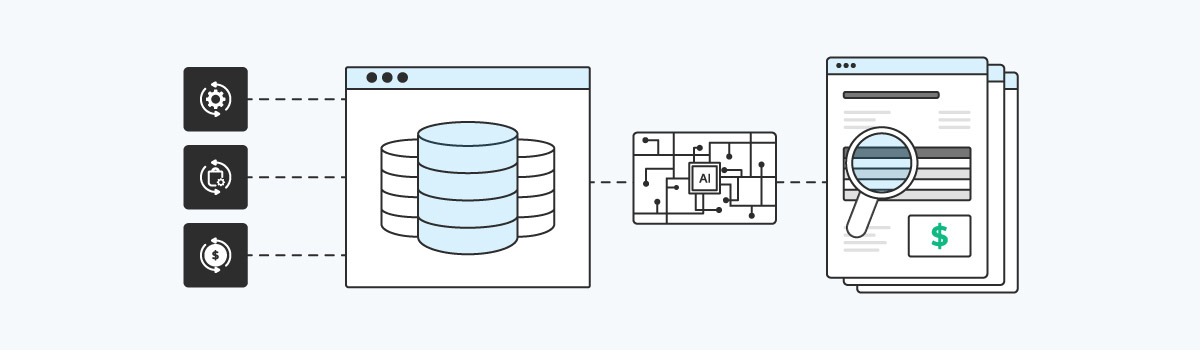
While Copilot already delivers impressive automation, businesses can unlock even more capabilities by integrating Microsoft Dataverse. Dataverse allows you to unify data across departments such as finance, procurement, and operations, making it easier for AI to access the full picture of each transaction.
This integration ensures that Copilot has access to comprehensive data from multiple sources, improving accuracy in matching invoices with purchase orders and streamlining the overall process. By pulling together data in one central hub, businesses can achieve a higher level of automation, without requiring manual interventions to resolve data silos.
Gaining Insights with Power BI

Once the invoices are processed, businesses can use Power BI to monitor payment cycles, identify bottlenecks, and track vendor performance. With real-time dashboards, finance teams can easily identify where the process is slowing down and make adjustments to improve efficiency. These insights are invaluable in keeping the payables process smooth and preventing cash flow issues.
Payment timelines
Power BI can highlight invoices pending approval or identify delays in the payment process.
Vendor Performance
Leverage data from the NIC Systems Vendor Insights app to view vendor performance trends and quickly identify top-performing and underperforming vendors.
Cash Flow Management
Use AI-generated insights to better manage your working capital and prepare for upcoming expenditures.
Why AI-Powered Invoice Matching Matters for Food Manufacturers

The potential for AI-powered tools like Microsoft Copilot to automate and streamline invoice matching offers businesses a major competitive advantage. For food manufacturers, where managing inventory and supplier relationships is key, reducing the time and effort spent on tedious financial processes can have a direct impact on the bottom line.
By embracing AI-powered tools today, you can not only reduce manual work but also improve accuracy, speed up payment cycles, and free up your team to focus on more strategic tasks. The combination of Copilot, Dataverse, and Power BI offers a comprehensive solution for businesses looking to enhance their financial processes and stay ahead of the curve.
About FoodCloudPlus Services
We leverage the Microsoft Dynamics 365 Business Central platform and add food-specific functionality through our BC Apps that addresses compliance, food safety, quality, recalls, recipe management, batch processing, staging and spice room management.